Meet Peter, SuperPlatform's built-in help, and other November updates
SuperPlatform has built-in help now, called Peter. UA and Finance dashboards you come back to open in under two seconds, and AI dashboards pick up new data about two hours after it lands instead of once a day. The SuperScale look from our October update is now the default for everyone. Nearly all of it is Peter Sulik's work.
Meet Peter
Peter is the Help button at the bottom of the side menu. He shows the guides for the page you're on and searches all of SuperPlatform's help. Each guide opens with its screenshots right next to your work, so you can follow the steps as you go. You see the guides your role can use.
Faster dashboards, fresher data
The UA and Finance dashboards keep each view's numbers until the project's data is refreshed, and recalculate the views opened in the last week shortly after new data lands. Opening one no longer waits for every chart to be recalculated. The values in the UA filters are kept the same way, and the Finance dashboard's business plan table opens right away. Measured on production, opening a view that was opened before:
- UA summary, until all its numbers show: 0.4 seconds, down from 6.4.
- Finance dashboard, until all its numbers show: 1.6 seconds, down from 4.6.
- UA filter values, the first time after a release: 2.1 seconds, down from 23.6.

SuperScale Media pages and AI dashboards pick up a project's new data about two hours after it lands, instead of once a day. An AI dashboard also shows all its data in 14.5 seconds, down from 29.6, because its charts no longer wait for the filter lists.
The change badges on the KPI tiles of the UA summary and the Finance dashboard compare the months you select with the same number of months right before them, so September to November is compared with June to August.
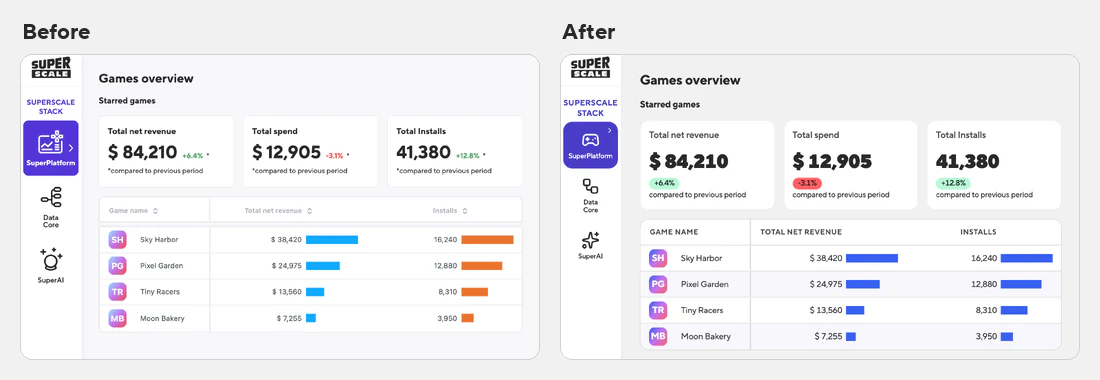
The Games overview fetches every game's figures and icons in three requests instead of three per game, so the whole table fills in at once. Pages are lighter too. A page without tables starts with 1.85 MB of code instead of 4.2 MB, because it no longer downloads the table library. Fonts take 384 KB per page over the network instead of 512 KB, now that typefaces and icons come as WOFF2.
The new look is the default
The classic look stays available: choose Classic look in the theme menu at the bottom of the sidebar. Selected items in lists and trees read better in dark mode, and while SuperPlatform starts, dots gather into the SuperScale S.
Phones, tablets and screen readers
On phones, dialogs, both date pickers, tables and the task editor fit the screen, with Apply, Save, Update and Dry run in reach. KPI tiles sit two to a row, and the open menu dims the page and closes when you tap beside it. On tablets, the AI dashboard editor slides its widget list and properties over the dashboard, so the dashboard keeps the full width and Publish stays in reach.
Screen readers now name the buttons, switches and fields that had no name, from the side navigation to the pipeline toolbar and the task editor. Checkboxes in forms tick when you click their label.
Fixed
- The Finance dashboard opens without an "Internal server error" again.
- UA dashboard filters fill in again. They used to time out after five minutes and stay empty.
- SuperScale Media pages show their campaigns again. When a project isn't set up yet, the page says so and lists the SuperScale admins to email.
- CSV imports keep values that contain a line break, instead of dropping those rows or failing the whole load. This fix is Tomas Daneshjo's.
- Pipeline runs waiting on BigQuery jobs that SuperPlatform no longer tracks are cancelled instead of staying in progress.
Also new
If you sign in with Google, your profile photo shows as your avatar in the side menu and on the Account page. To go back to your initials, switch back under Preferences on the Account page. Until you star a game, the Games overview explains what starring does, and offers to show all games when they're hidden. Opening a project takes you to the first page in its menu instead of Data Core; this one is Daniel Derevjanik's.
SuperPlatform is the semantic layer of the SuperScale Stack. 30+ no-SDK integrations into one gaming-native source of truth, deployed in your own BigQuery. You own the data. See how SuperPlatform works.